

Service Home
Service Home
- The service Home menu page will be the landing page of the Service portal. It provides the status counts of the Service requests in a dashboard along with the summary view of the dashboard counts.
- Based on the dashboard can see the summary of the tickets.
- Following buttons to be provided in the service home,
- Create – When clicking on the create button, the user should navigate to create service request page
- Refresh Preferences – Refresh the readjust the FiO gird fields
- Save Preferences – The user can readjust the FiO gird fields of the summary as per user login and once clicks on the Save the Preferences button, preferences will be saved to the login.
- Export – When a User clicks on the export button, current summary records need to be downloaded in a CSV file.
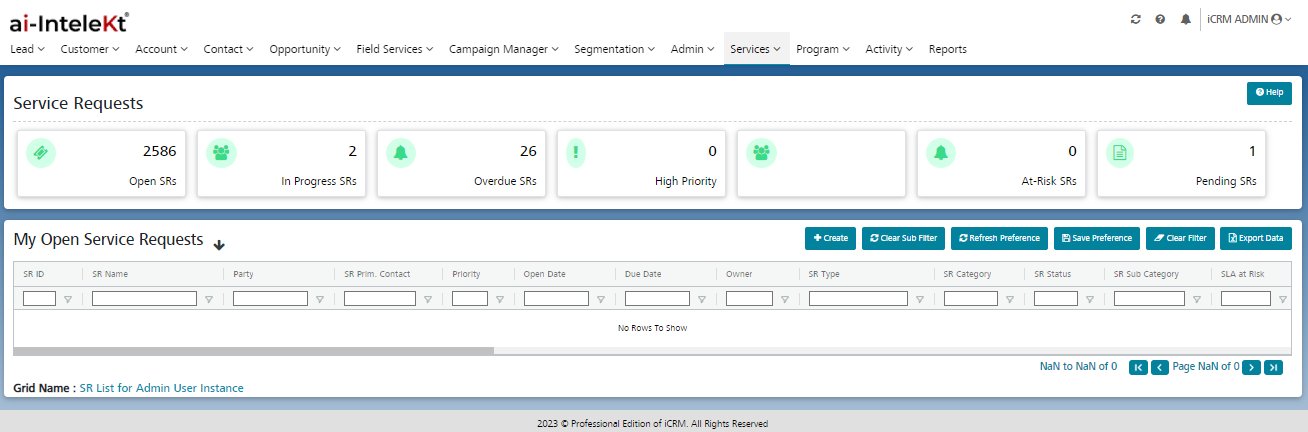
Open SRs:
1. Following SR status will be considered as Open SRs in the Services portal.
| ICRM SR Status | Servicing Portal |
|---|---|
| Open | Reopened = Open |
| Open | Open |
2. All open service requests tagged to the account are to be displayed in a dashboard with hyperlinks.
3. When a user clicks on the record, should get navigated to view the service request page.
In Progress SRs:
1. The task is assigned to the development Team or You working on the task, it comes under In Progress Status .
2. When user clicks on the record, should get navigated to the view service request page.
Overdue SRs:
1. The Task is not completed on the Due date, it will be collected in the Overdue SRs.
2. All the Overdue SRs is tagged to account to be displayed in a dashboard with hyperlink.
3. When user clicks on the record, should get navigated to view service request page.
Pending SRs:
The following SR status will be considered as Pending SRs in the Services portal .
|
ICRM SR status |
Servicing Portal |
|
Open |
Pending SRs |
|
At Risk SRs |
Pending SRs |
|
In Progress |
Pending SRs |
|
Overdue |
Pending SRs |
|
Reopened = Open |
Pending SRs |
- All pending SRs service requests tagged to the account are to be displayed in a dashboard with hyperlinks.
- The default summary of User home is to be provided as open service requests of the account.
- When a user clicks on the record, should get navigated to view the service request page.
Note:
In All the above scenarios,
1. The summary should display maximum 20 records in one page and should follow the pagination.
2. Summary should display the latest created/updated records in the first sequence.