

Find Services
Find Services
- The portal is to be provided with the Find service request menu. Once the user clicks on the Find Service request sub-menu, the user should be navigated to the find service request page.
- Following buttons are to be provided in the Find Services,
- Create – When a user clicks on the create button, the user should navigate to create service request page
- Save Preferences – The user can readjust the FiO gird fields of the summary as per user login and once clicks on the Save the preferences button, preferences will be saved to the login.
- Refresh Preferences – Refresh the readjust the FiO gird fields
- Export – When a User clicks on the export button, current summary records need to be downloaded in a csv file.
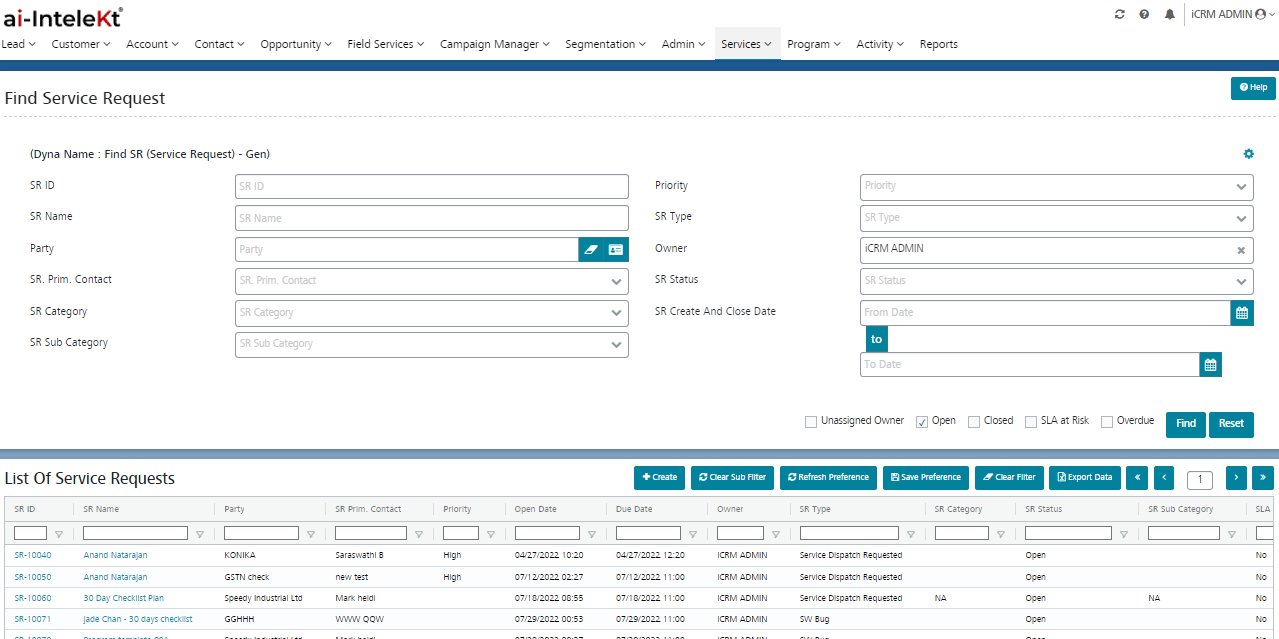
- Find the SR page to be provided with the following sections,
– Search section – Default view
– Search Summary – Based on search results, a search summary is to be displayed. - Search Section:
The search section follows AND operation for more than one search input and follows AND operation for filter checkboxes.
Following are the search fields of the search section,
| S.No | Fields | Field Type |
| 1 | SR ID | Text |
| 2 | SR Name | Text |
| 3 | Party | Text |
| 4 | SR Prim Contact | Dropdown |
| 5 | SR Status | Dropdown |
| 6 | SR Priority | Dropdown |
| 7 | Open Date | Date |
| 8 | Due Date | Date |
| 9 | SR Owner | Dropdown |
- Search summary displays the records based on search results, if no match is founds, it displays as “No Rows to Show”.
- Based on the search results, FiO Gird summary displays the matched records whereas the sequence follows the latest created/updated records as first.
- Maximum of 10 records will be displayed on the search summary page and follows the pagination for the remaining records.
- User can navigate to the view service request page by clicking the record hyperlink from the summary.
- Search Summary consists following grid fields,
| S.No | Fields |
| 1 | SR Name – Hyperlink |
| 2 | SR ID |
| 3 | Party |
| 4 | SR Status |
| 5 | Priority |
| 6 | Open Date |
| 7 | Due Date |
| 8 | Owner |
| 9 | SR Type |
| 10 | SR Category |
| 12 | SR Subcategory |
| 13 | SLA at Risk |
| 14 | Over Due |
| 15 | Party Type |
| 16 | Order ID |
| 17 | Linked From |
| 18 | SR Source |
| 19 | Once and Done |
| 20 | Estimated / Quoted Time |
| 21 | Customer Approval Status |
| 22 | Billed |
| 23 | Created On |
| 24 | Created By |
| 25 | Modified On |
| 26 | Modified BY |
| 27 | Closed On |
| 28 | Closed By |