

NOTE: If you do not have a transaction opened on your screen, you can go to Group FiO’s FIND A SALES INVOICE section, or just CREATE A NEW SALES INVOICE.
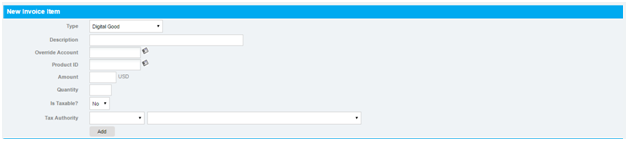
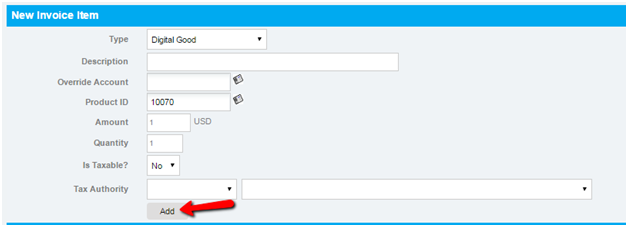
1. Below the SALES INVOICE and INVOICE TERMS, you will see the NEW INVOICE ITEM SECTION. Provide necessary details, and then click the “ADD” button.
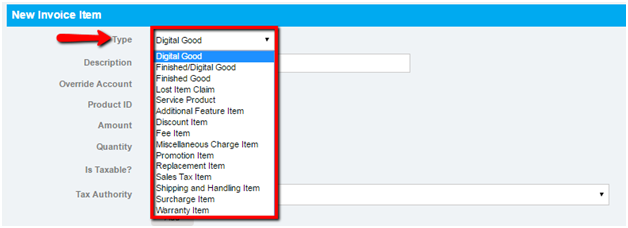
a. Choose: Finished Good, Sales Tax Item, Purchase Withhold Tax or Other Type.
b. Type the nature of payment
c. Type of account to be charged.
d. Product ID (provided by the client/supplier).
e. Put the total amount of payment.
f. Put the total order quantity
g. Choose the division/department to be charged normally for expenses.
h. Choose: Exempt, Zero Rated, Sales to Government, VAT.
3. Click “ADD” button.
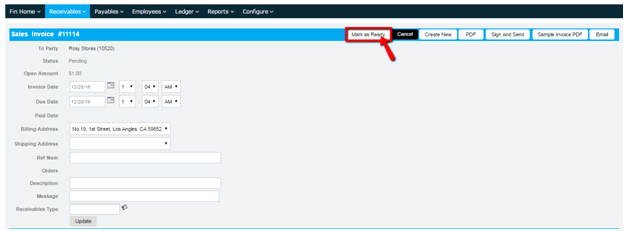
4. Click on “MARK AS READY” button to post your entry to the General Ledger (GL).